Joyflix Plus
- 4.6
- Rating
- 100.00K
- Installs
- Free
- Price

 Analysis by App-foxy
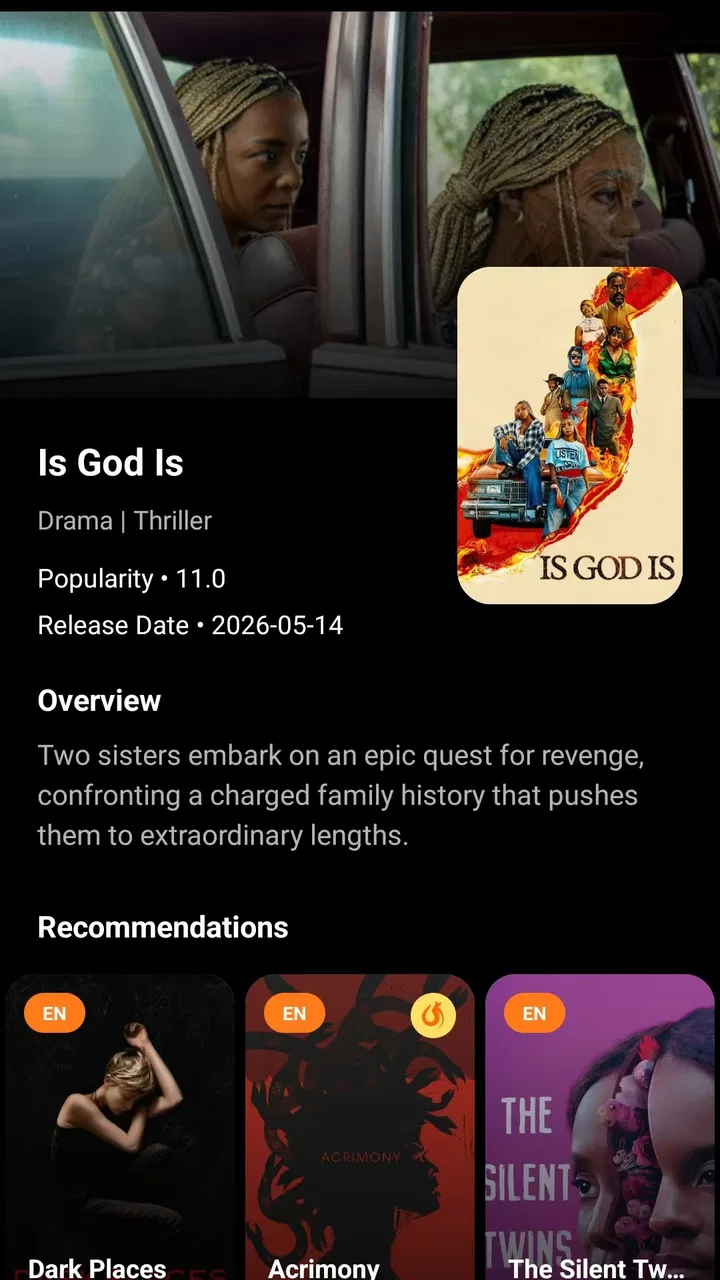
I approached Joyflix Plus as a lightweight entertainment companion rather than a full streaming service. Its purpose is straightforward: help me browse basic information about movies and TV shows when I want a quick orientation before deciding what to watch. That distinction matters immediately. I did not treat it as a replacement for a subscription platform, a rental store, or a complete film database. I used it as a simple starting point for exploring titles.
The app is free, belongs to the entertainment category, and comes from Jayhawk Pipeline, L.L.C. Its store summary focuses on basic movie and television information, which is a useful description of the experience. The current release is version 1.0.7, and it supports devices running Android 8.0 or later. The age classification is Teen, so families should still use their own judgement when handing it to younger viewers.
After spending time with it, my main impression is that Joyflix Plus works best when I already have a small question in mind: “What is this film about?”, “Which show was that actor in?”, or “Do I want to investigate this title before opening another app?” It is less convincing for someone who expects a large, highly personalized discovery system with deep editorial tools.
You May Also Like

 Blood Strike: 2.5 Anniversary
Blood Strike’s Loadouts Turn Every Drop Into a Tactical Gamble
A close look at Blood Strike’s custom loadouts: how fast access to signature weapons reshapes its battle royale rhythm, rewards preparation, and narrows the gap between fights.

 Pandora - Music & Podcasts
Pandora’s Music Is Easy to Start, but Harder to Recover
Pandora’s strength is its low-effort path from a seed to a station. Its weak spot is how much confidence it asks you to place in connection, setup, and quiet recovery.

 8 Ball Pool
8 Ball Pool Is Built on Rivalries, Rematches, and Routine
A close look at the rivalries, rematches, shared routines, and unanswered safety questions that turn a quick pool match into a persistent mobile community.

 Samsung Music
Samsung Music’s Quiet Strength Is Playing What You Already Own
Its reach comes less from spectacle than from dependable access to a personal library. That simplicity is both the app’s strongest retention engine and its ceiling.

 AccuWeather: Weather Radar
AccuWeather Review: A Quick, Clear Forecast for Everyday Decisions
For everyday plans, the best forecast is the one you can understand quickly. AccuWeather makes rain timing, radar, and local conditions easy to act on, with a few trade-offs.

 Hill Climb Racing
Why Hill Climb Racing Still Turns Crashes Into One More Run
A tiny car, a bumpy hill and one more upgrade: Hill Climb Racing keeps resurfacing because its simple chaos makes every near-miss feel personal.
More From Our News Desk



What to expect from Joyflix Plus
The first thing to understand is the app’s modest scope. It presents itself as a place for basic information, so the useful outcome is not watching a movie inside the app. The useful outcome is leaving with enough context to make a viewing decision elsewhere or to continue researching a title with less guesswork.
That makes it particularly handy during ordinary moments. I can imagine opening it while a friend mentions a show I have never heard of, while choosing something for a relaxed evening, or while trying to remember whether a film belongs to a series. In those situations, a focused information app can be more convenient than opening a streaming service, waiting for its recommendations, and navigating through several rows of unrelated content.
At the same time, I would not install it expecting the depth of a specialist movie database. Joyflix Plus is better understood as a quick reference point. Its appeal comes from reducing the first bit of friction between hearing about a title and deciding whether it deserves more attention.
The app has attracted a healthy level of early interest, with more than one hundred thousand installs and an average score of 4.6 from roughly one thousand ratings. Those figures suggest that its simple approach is connecting with many users, although a rating alone cannot tell me whether it suits my particular habits. Someone who wants quick title information may be delighted, while a viewer searching for advanced filtering or detailed catalog management may find the experience too limited.
Who will get the most from it
I see Joyflix Plus fitting three kinds of users especially well. The first is the casual viewer who wants a fast answer before committing to a movie or series. The second is the person who regularly receives recommendations from friends and needs a convenient way to investigate unfamiliar names. The third is anyone who prefers separating discovery from playback, using one app to gather context and another service to watch.
It can also be useful for shared decisions. When two people disagree about what to watch, checking a title’s basic information together can turn an abstract argument into a quicker choice. Instead of relying only on a poster or a familiar actor, we can pause and look at the information available before moving on.
I would be more cautious about recommending it to dedicated film enthusiasts who organize large watchlists, compare extensive credits, track viewing history, or expect detailed technical information. Those users may be better served by a more specialized database or by the discovery tools built into their preferred streaming platform.
Getting through the first setup
The installation decision is uncomplicated because the app is free. Before installing, I would still check that the phone meets the Android 8.0 minimum and remember that the Teen classification is part of the app’s store profile. That small check avoids an unnecessary download attempt on an older device and helps parents decide whether it belongs on a shared family phone.
Once installed, my advice is to approach the opening screen with one concrete title in mind. A first-time user can easily waste the first few minutes tapping around without a goal, especially in an information app that is intentionally less ambitious than a streaming platform. Starting with a known movie or show gives the interface a fair test and makes it easier to understand what kind of information Joyflix Plus is designed to provide.
I would also avoid judging it by the standards of a playback app. The meaningful question is not whether it begins a video instantly. The better question is whether it helps me decide what to investigate next. That change in expectation makes the initial experience feel clearer and more useful.
Because the developer is Jayhawk Pipeline, L.L.C., I would keep the version number visible when checking for updates or discussing the app with support: the release I reviewed is 1.0.7. This is a practical habit rather than a feature, but it prevents confusion if the interface changes later or if another person is using a different release.
Turning the first search into a useful result
The first successful action should be simple: choose a movie or TV show, inspect its available basic information, and decide what you want to do next. That might mean searching for the title in a separate streaming service, saving the name in a personal note, or sending the recommendation to a friend. The important point is to treat the result as a decision aid rather than as the final destination.
Here is the everyday workflow I found most sensible. A friend suggests a series during lunch. I open Joyflix Plus and use the title as my starting point. After checking the information shown, I decide whether the premise sounds right for me. If it does, I move to the service where I normally watch shows. If it does not, I have avoided spending time opening several apps and scanning an entire catalog.
This workflow reveals one of the app’s less obvious strengths: it can act as a neutral pause before the pressure of a streaming catalog takes over. Streaming apps are designed to keep me browsing, and that can turn a ten-minute decision into a long session of scrolling. Joyflix Plus is more useful when I want information first and entertainment second.
A second practical use is preparing a small watch plan before a trip or a weekend. I can investigate titles in advance, note the ones that sound promising, and then check availability on my usual service later. The trade-off is that Joyflix Plus does not remove the final availability check. A title being interesting does not guarantee that it is included in the service I use, so I still need that second step.
Where first-time users may become confused
The most likely confusion comes from assuming that information about a title is the same thing as access to the title. Joyflix Plus should not be approached as though it automatically provides the complete viewing experience. I would not open it expecting a film to start simply because I found its page or details.
A related misunderstanding is expecting every discovery feature from a modern streaming service. Streaming platforms often combine recommendations, playback, subscriptions, downloads, profiles, and personalized rows in one place. Joyflix Plus has a narrower role. That can feel refreshing when I want a clean reference task, but it can also feel sparse if I am looking for a complete entertainment hub.
Another point worth keeping in mind is the word “basic.” Basic information is enough for a quick decision, but it may not answer every question an experienced viewer has. If I need a detailed comparison between several releases, a complete cast investigation, extensive reviews, or a carefully managed watch history, I should use a service built around that specific purpose instead of forcing Joyflix Plus to behave like one.
I also recommend avoiding a rushed judgement based on a single title. An information app can feel unhelpful if the first search is obscure or if I arrive without knowing what I want to learn. Testing it with a familiar movie and then with a show I am considering gives a better sense of whether its presentation matches my habits.
Three ways to use it more intelligently
My first tip is to use Joyflix Plus before opening a streaming app, not after. This reverses the usual order and reduces the temptation to browse endlessly. I can form a short list of possibilities first, then check which one is available where I already subscribe. The benefit is better control over my time; the cost is one extra app switch.
My second tip is to use it as a conversation tool. When someone recommends a title, I can check it immediately instead of relying on a half-remembered description. This is especially useful when several shows have similar names or when a film is part of a broader series. The app becomes a shared reference during a decision, rather than a solitary browsing destination.
My third tip is to separate discovery from verification. Joyflix Plus can help me understand why a title might be worth investigating, but I should confirm where and how I can watch it in the service I plan to use. This two-stage workflow is slightly less convenient than an all-in-one platform, yet it is more honest and keeps the app’s role clear.
A fourth useful habit is to keep the Teen classification in mind when using the app around children. The rating describes the app’s content classification, not a personal recommendation for every title a user may investigate. Parents should still guide the final viewing choice, particularly when a child is browsing independently.
How it compares with familiar alternatives
Compared with a streaming service’s built-in search, Joyflix Plus offers a more focused reason to open an app: gathering basic information before playback. A streaming platform is usually better once I know what I want to watch, because it can connect the title directly to viewing. Joyflix Plus is more useful earlier, when I am still deciding whether a title deserves attention.
Compared with a specialist movie database, the trade-off goes in the opposite direction. A dedicated database is likely to suit people who want deep research, extensive credits, detailed tracking, or advanced organization. Joyflix Plus makes more sense for a lighter task where I want to understand the basics without turning a casual recommendation into a research project.
Compared with a general web search, the app can feel less distracting because its purpose is tied to movies and television. A web search may produce more varied results, but it can also lead me through advertisements, unrelated pages, and conflicting summaries. Joyflix Plus is preferable when I want a compact entertainment-focused starting point.
None of these alternatives is automatically better. The right choice depends on the question. For “Where can I watch this right now?”, I would begin with my streaming services. For “What else has this performer done?”, I would choose a deeper reference source. For “Should I spend time investigating this title?”, Joyflix Plus is the more natural first step.
Who should skip it
I would skip Joyflix Plus if my main requirement is watching content inside the same app. I would also look elsewhere if I need robust personal organization, detailed editorial analysis, or a single place that combines discovery, availability, playback, and history. Its free price is attractive, but free does not mean it can replace every tool in the entertainment process.
I would also skip it if I rarely look up unfamiliar movies or shows. Someone who watches only from a familiar subscription library may gain little from adding another reference app. In that case, the built-in search and recommendation rows of the existing service may be faster.
On the other hand, I would recommend giving it a chance if I often hear about titles outside my usual viewing habits. The app’s narrow focus becomes an advantage when I need a quick, low-commitment way to investigate something new.
My final take after using the app
Joyflix Plus succeeds by keeping its purpose understandable. It is a free entertainment app for checking basic information about movies and TV shows, and that is the role I would give it on my phone. I would not present it as a streaming replacement or as a complete film research library. I would present it as a convenient first stop.
The app’s early reception is encouraging, with a 4.6 average and around one thousand ratings, while its audience has grown beyond one hundred thousand installs. Those numbers make it worth trying, but the real test is personal: do I regularly need a quick answer before choosing what to watch? If yes, its focused design can save time and make recommendations easier to evaluate.
My recommendation is therefore practical rather than universal. Install it when you want a simple bridge between hearing about a movie or show and deciding whether to pursue it. Keep a streaming app nearby for playback and a deeper reference service for serious research. Joyflix Plus is at its best when it handles the first decision cleanly, without pretending to be the entire entertainment journey.
FAQs for Joyflix Plus
01What is Joyflix Plus and what kind of content does it offer?
Joyflix Plus is presented as an entertainment streaming application designed for watching video content on a mobile device. Depending on your region and the current version of the app, its catalog may include movies, series, short videos, or other on-demand programming. Before downloading, users should check the official description, supported countries, available genres, and whether the advertised library matches their viewing preferences.
02Is Joyflix Plus free to download and use?
The application may be free to download, but that does not always mean every feature or title is available without restrictions. Joyflix Plus could include advertising, premium memberships, paid access, or content that requires an account. Review the pricing information shown in the official app store and inside the application before subscribing, and confirm the renewal terms if a trial period is offered.
03Is Joyflix Plus safe and legitimate to install?
For a safer installation, download Joyflix Plus only from a trusted official source, such as the Google Play Store or Apple App Store, when it is available there. Check the developer name, recent reviews, update history, privacy information, and requested permissions. Avoid modified APK files or unofficial download pages, since they may contain malware, altered features, excessive advertising, or risks to your personal information.
04Does Joyflix Plus work on Android and iPhone, and can I watch offline?
Compatibility and offline viewing depend on the version released for your device and the features enabled by the developer. Check the minimum Android or iOS requirements before installing, especially if your phone uses an older operating system. If downloads are supported, the app may limit offline playback to selected titles, require a premium plan, or restrict downloaded videos to the application itself.
05What should I know about privacy, accounts, and streaming quality?
Joyflix Plus may request an account and collect information such as your email address, device details, viewing activity, or diagnostic data, depending on its privacy policy. Read the policy before registering and avoid sharing unnecessary personal information. Streaming quality can also vary with your internet connection, device, and server availability, so Wi-Fi is recommended for high-resolution playback and longer viewing sessions.
Pros
- Simple interface makes browsing movies and shows quick.
- Personalized recommendations help users discover new content.
- Supports streaming on compatible Android and iOS devices.
- Regular content updates keep the catalog feeling fresh.
- Convenient playback controls make viewing easy on mobile devices.
Cons
- Content availability may vary by region and licensing agreements.
- Some titles may require a premium subscription to access.
- Streaming quality depends heavily on your internet connection.
- The app may use significant mobile data during high-quality playback.
- Older devices might experience lag or compatibility issues.

Joyflix Plus
Gallery